How to Get Client Approval on Influencer Selections in Minutes (Not Days)
You've spent two weeks finding the perfect creators for your client's campaign. You've vetted their content, checked engagement rates, negotiated rates, and built a shortlist of 20 creators. Now you need one thing: your client's approval.
And this is where the process breaks down.
The Approval Bottleneck Every Agency Knows
Here's what the approval workflow looks like at most influencer marketing agencies:
- Export your creator shortlist to a spreadsheet
- Add profile links, follower counts, engagement rates, and sample content
- Email the spreadsheet to your client with "Please review and let me know"
- Client replies three days later with vague feedback buried in an email thread
- You manually update the spreadsheet with their responses
- Repeat for every round of revisions
The average agency spends 3-5 days waiting for client approval per campaign
That's 3-5 days where your creators are waiting, your pipeline is stalled, and your competitors might be reaching out to the same talent.
The problem isn't your client being slow. It's the process. You're asking busy marketing directors to open a spreadsheet, cross-reference Instagram profiles in separate tabs, form opinions, then write them all in an email. That's friction. Friction causes delays.
What a Client Approval Workflow Should Look Like
The ideal approval experience has three properties:
- Zero friction for the client — No login, no account creation, no app download. Click a link, start reviewing.
- All context in one place — Creator name, handle, platform, followers, engagement rate, and a link to their profile. No tab-switching.
- Structured feedback — Approve, reject, or hold for each creator. Not "I like some of these" buried in paragraph four of an email.
How Infloxy's Client Approval Portal Works
Infloxy has a built-in approval portal designed specifically for this workflow. Here's how it works:
Build your shortlist in the CRM
Add creators to a campaign in Infloxy as you normally would. Their profile data — handle, followers, engagement rate, platform — is already in the system.
Generate a shareable approval link
Click "Share for approval" and Infloxy generates a unique link for your client. Set an expiry date if needed. No client account required.
Client reviews and votes
Your client opens the link and sees every creator with their stats. They vote: Approve, Reject, On Hold, or Disqualify. They can add comments on individual creators. Progress is tracked in real time.
You see results instantly
Votes and comments appear in your Infloxy dashboard in real time. No follow-up email needed. You know exactly which creators are approved and can move them forward in the pipeline immediately.
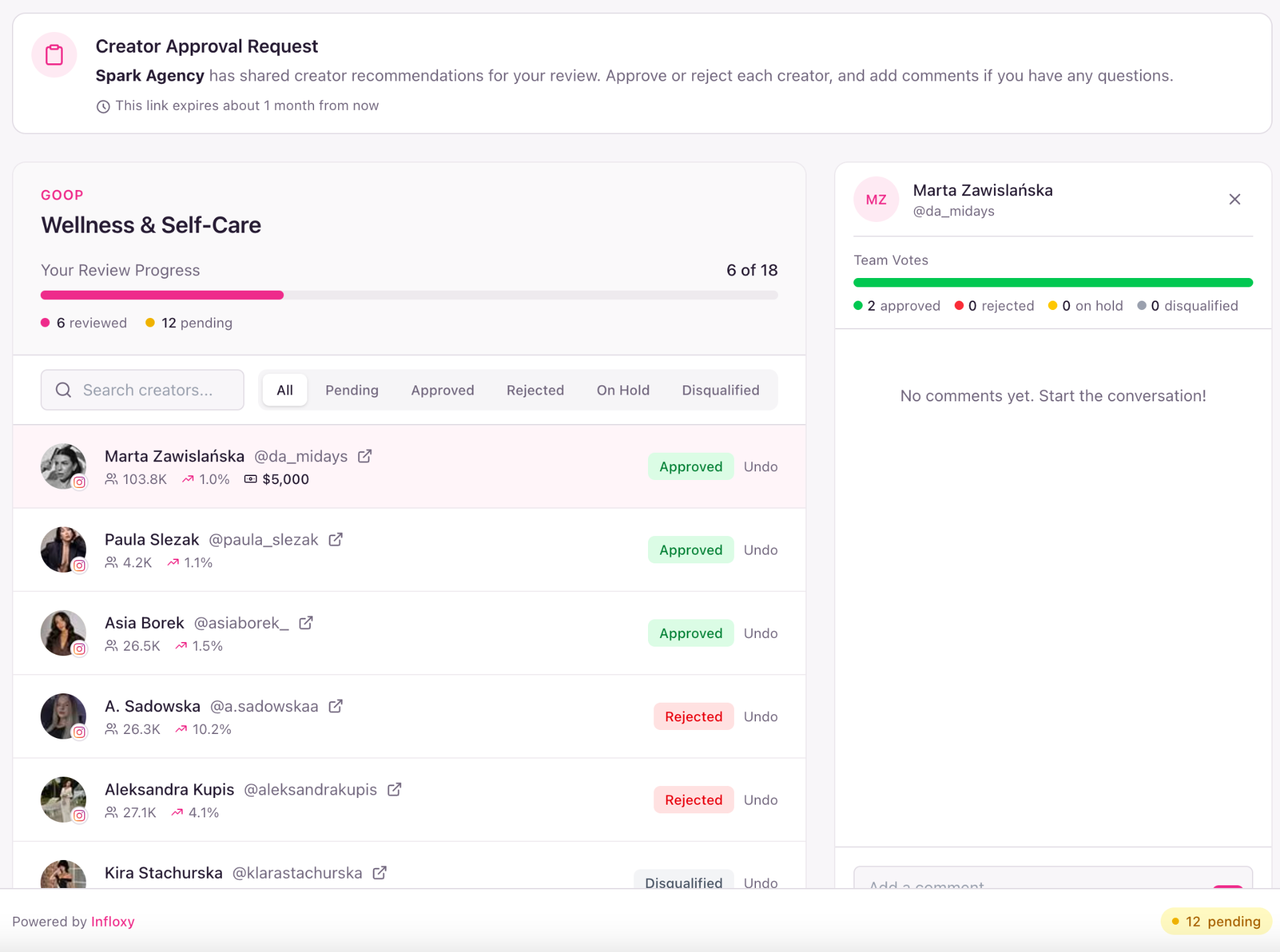
What the Client Sees
When your client opens the approval link, they see:
- Campaign context — Brand name, campaign name, and a message explaining what they're reviewing
- Review progress — A progress bar showing how many creators they've reviewed out of the total (e.g., "4 of 19")
- Creator cards — Each creator with their handle, followers, engagement rate, and a link to their profile
- Vote buttons — Approve, Reject, On Hold, or Disqualify for each creator
- Team votes — If multiple stakeholders are reviewing, they can see aggregated votes and comments
- Comments — Add context or concerns on specific creators
- Filter and search — Filter by status (Pending, Approved, Rejected, On Hold) or search by name
No login. No account. No friction.
Your client clicks a link and starts voting. That's it. No "create an account," no "download our app," no "join this workspace." The fastest path from shortlist to approval.
Why This Matters More Than You Think
Speed wins deals
In influencer marketing, timing matters. Popular creators get multiple offers. Every day your shortlist sits in a client's inbox unapproved is a day a creator might commit to another brand. Cutting approval time from 5 days to 5 minutes means you lock in your top picks before anyone else.
Structured feedback prevents miscommunication
"I like most of them but not sure about a few" is not actionable feedback. When every creator has a clear status — Approved, Rejected, On Hold — there's no ambiguity. No follow-up emails asking "which ones did you mean?"
Multiple stakeholders, one view
Many campaigns involve multiple decision-makers on the client side — the brand manager, the marketing director, sometimes legal. With a shared approval link, everyone votes independently and you see the aggregated result. No more consolidating feedback from five different email threads.
Professional client experience
Sending a polished approval portal instead of a spreadsheet signals that your agency runs a professional operation. It's a small thing that builds client trust and retention.
How Agencies Used to Handle This
Before dedicated approval tools, agencies used a patchwork of:
- Google Sheets — Shared spreadsheets with conditional formatting. Clients often break the formatting, edit the wrong cells, or simply don't open the link.
- Email threads — "Re: Re: Re: Fwd: Creator Shortlist — Final v3" with feedback scattered across 14 messages.
- Notion or Airtable — Better than spreadsheets, but requires the client to understand the tool's interface. Still too much friction.
- PDF decks — Beautiful but completely non-interactive. Client has to email back with written notes referencing page numbers.
All of these share the same fundamental problem: they weren't designed for the specific task of reviewing and voting on creator selections. They're general-purpose tools forced into a specialized workflow.
Setting Up Approvals in Infloxy
The entire setup takes under 2 minutes:
- Add creators to your campaign pipeline in Infloxy
- Click "Share for Approval" on the campaign
- Set an optional expiry date for the link
- Send the link to your client via email, Slack, WhatsApp — whatever they prefer
- Watch votes come in on your dashboard
No onboarding. No training. No "can you walk me through how to use this?" calls from your client.
Built for agencies managing multiple brand clients
Each campaign gets its own approval link. Each client sees only their campaign. Your agency manages everything from one dashboard.
Key Takeaways
- Client approval is one of the biggest bottlenecks in influencer campaign operations
- Spreadsheets, email threads, and PDFs create friction that causes multi-day delays
- A dedicated approval portal with no-login voting cuts approval time from days to minutes
- Structured voting (Approve / Reject / Hold) eliminates ambiguous feedback
- Multiple stakeholders can review independently — no more consolidating email threads
If your agency is still emailing spreadsheets for client sign-off, there's a better way. See how Infloxy's approval portal works in a 15-minute demo.
Ready to Replace Your Influencer Marketing Stack?
Book a 15-minute demo and see how AI-powered workflows can transform your influencer operations.
Try for Free